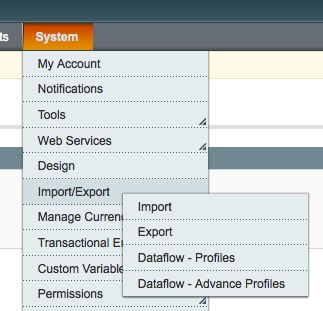
 Magento easily Export Customer lists in the eCommerce store. Magento also have the options to export selected data only in the customer profile.
Magento customer profile have many data fields to store the customer informations. We need to export particular data in our store profile. For ex. we need to export only Firstname and Last name of the customer
profile.
Please follow the below steps to export,
- Go to Admin -> System
- Import / Export -> Dataflow profile
In the data flow profile have the list of defaul export / Import lists. We need to customize as per our requirment like to export Customer First name and Last name.
Add new profile -> file the Profile form to update below way,
- Name
- select customer
- select export
- Export format xml or csv
- select only mapped data's
- Add Field Mapping
- Select First name
- Select Last name
Now save profile
Now added new dataflow profile in our dataflow lists. Now click -> Run profile -> Run profile in popup
Now Go to download all the exported data's stored in Var/Export Location.
Hopefully this article usefule for you. Please comment for your thoughts and be share this if its usefull.


